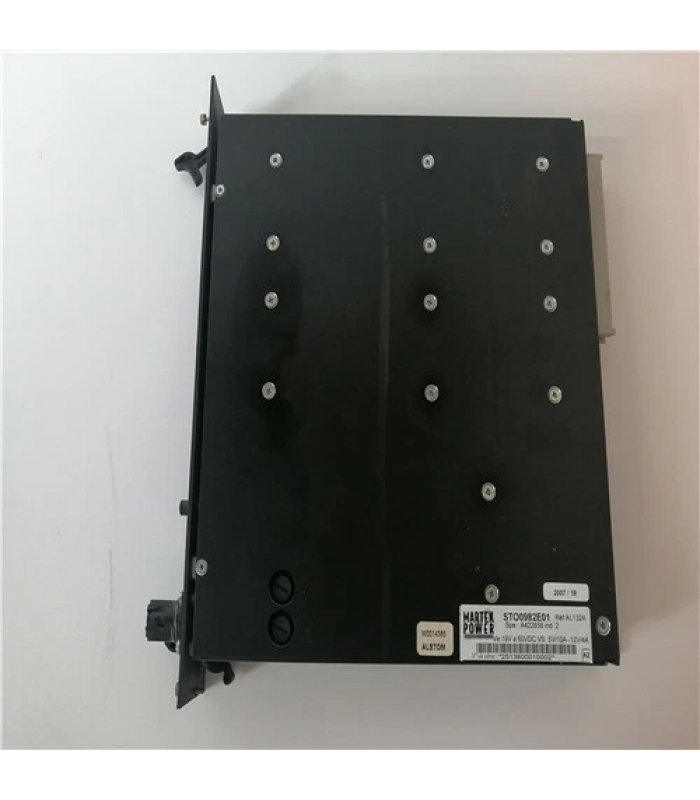
Product Overview
The Alstom AL132 AL132A STO0982E01 is a high-performance industrial controller module designed for demanding automation and process control applications. Manufactured by Alstom (now part of GE's Power division), this module integrates advanced control technology with high-quality components to deliver efficient, stable, and safe operation in harsh industrial environments.
Key Features
- High reliability for harsh industrial environments
- Modular design for easy integration and expansion
- Advanced control capabilities for complex industrial processes
- Multiple communication interfaces for seamless system integration
- Compliance with international industry standards
- User-friendly configuration and monitoring capabilities
- Robust construction for long-term operation
Applications
The Alstom AL132 AL132A STO0982E01 module is suitable for a wide range of industrial applications:
- Power generation and distribution systems
- Industrial manufacturing processes
- Chemical and petrochemical industries
- Metallurgical processes
- Water treatment facilities
- Railway and transportation systems
- Automotive manufacturing
- Energy management systems
Installation Guide
CAUTION: Before installing the Alstom AL132 AL132A STO0982E01 module, ensure that power is disconnected from the system to prevent electrical shock or damage to equipment. Installation should only be performed by qualified personnel.
1. Preparation
- Verify that the installation environment meets the specified operating conditions:
- Temperature: -20°C to +50°C
- Relative humidity: 5% to 95% (non-condensing)
- Free from excessive vibration, dust, and corrosive substances
- Ensure the mounting surface or DIN rail is properly installed and grounded
- Prepare the necessary tools:
- Screwdriver set
- Wire strippers
- Torque wrench (if required)
- Multimeter for testing
- Inspect the module for any visible damage before installation
2. Mounting the Module
- Identify the correct location for mounting the module
- For DIN rail mounting:
- Align the module with the top of the DIN rail
- Press the module firmly onto the rail until it clicks into place
- Secure the module using the locking clip (if provided)
- For panel mounting:
- Use the provided mounting holes to secure the module to the panel
- Use appropriate screws and torque them to the recommended specification
3. Wiring Connections
Follow these steps to wire the Alstom AL132 AL132A STO0982E01 module:
- Connect the power supply:
- For 24V DC operation: Connect positive (+) and negative (-) terminals
- For 220V AC operation: Connect L, N, and ground terminals
- Ensure proper polarity and voltage rating
- Connect input signals:
- Connect field device signals to the appropriate input terminals
- Ensure proper signal type (digital/analog) matches the terminal configuration
- Connect output signals:
- Connect control devices to the appropriate output terminals
- Ensure output current ratings are not exceeded
- Connect communication interfaces:
- For Ethernet: Use Cat 5e or higher Ethernet cable
- For RS-485: Use shielded twisted-pair cable
- Ensure proper termination and grounding of communication lines
IMPORTANT: For early versions of remote bases (IC693CHS393E and earlier, IC693CHS399d and earlier), pin 1 of the connector end of the cable used to plug into the remote base must be disconnected before use.
4. Post-Installation Check
- Double-check all wiring connections for correctness
- Ensure all screws and connectors are securely fastened
- Verify that the module is properly mounted and secured
- Check for any loose wires or potential short circuits
- Ensure proper ventilation around the module
- Apply power to the system
- Verify that the power indicator illuminates
- Check for any fault indicators or error messages
Configuration Guide
Software Requirements
The Alstom AL132 AL132A STO0982E01 module is configured using Alstom's dedicated programming software:
- Alstom Harmony INFI 90 or compatible configuration software
- Compatible operating system (Windows 10 or later recommended)
- Minimum 4 GB RAM, 1 GB free disk space
- Ethernet or serial communication interface
Basic Configuration Steps
- Install the Alstom configuration software on your PC
- Connect the PC to the module via Ethernet or serial cable
- Launch the configuration software and establish communication with the module
- Identify the AL132 AL132A STO0982E01 module in the system topology
- Configure module parameters:
- Network settings (IP address, subnet mask, gateway)
- Input/output configuration
- Communication protocol settings
- Module-specific parameters
- Develop and download the application program:
- Create control logic using IEC 61131-3 programming languages
- Configure input/output mappings
- Implement data acquisition and processing functions
- Set up communication with other system components
- Compile and verify the program
- Download to the module
- Test the configuration and application program
- Save the configuration to a secure location
Communication Configuration
The AL132 AL132A STO0982E01 module supports various communication protocols and configurations:
Ethernet Configuration
- Set IP address, subnet mask, and gateway
- Configure communication ports and protocols
- Set up network security parameters
RS-485 Configuration
- Set baud rate, parity, data bits, and stop bits
- Configure Modbus address
- Set up communication timeout parameters
Input/Output Configuration
Configure the module's I/O according to your application requirements:
- Define input types (digital/analog)
- Set input signal ranges and scaling
- Configure output types and ranges
- Set up alarm thresholds and conditions
- Configure digital output pulse widths (if applicable)
NOTE: After configuration, always back up your settings to a secure device. This will facilitate quick recovery in case of module replacement or system failure.
Troubleshooting Guide
NOTE: Before troubleshooting, always ensure that power is disconnected from the system to prevent electrical shock or damage to equipment, unless performing live diagnostics.
Using Diagnostic Indicators
The AL132 AL132A STO0982E01 module is equipped with diagnostic indicators to help identify issues:
- Power Indicator: Illuminates when power is applied
- Run Indicator: Illuminates when the module is operating normally
- Fault Indicator: Illuminates when a fault is detected
- Communication Indicator: Flashes when data is being transmitted/received
- I/O Indicators: Indicate the status of individual input/output channels
Common Issues and Solutions
1. No Power Indication
- Check power supply connections
- Verify power supply voltage is within specified range
- Check power supply fuse
- Inspect for damaged power terminals
- Verify proper grounding
2. Communication Errors
- Check Ethernet/RS-485 cable connections
- Verify network settings (IP address, subnet mask, gateway)
- Check for communication parameter mismatches
- Inspect communication ports for damage
- Check for network congestion or interference
3. Input/Output Issues
- Check wiring connections for input/output channels
- Verify signal levels are within specified range
- Check for short circuits or open circuits
- Verify I/O configuration in the software
- Check for overcurrent conditions on output channels
4. Overcurrent Fault (AL.32)
- Check for short circuits on the output side (U·V·W phases)
- Verify no ground faults exist on the output side
- Check for electromagnetic interference affecting the current detection circuit
- Inspect power transistors (IPM) for damage
- Check connections to regenerative braking resistors
- Verify no noise contamination in command pulses
5. Module Not Responding
- Check power supply and connections
- Verify module is properly seated and secured
- Check for visible damage to the module
- Attempt a power cycle of the system
- Check for configuration errors
- Verify communication settings
Diagnostic Procedures
- Connect to the module using Alstom configuration software
- Navigate to the Diagnostics tab or menu
- Run a full system diagnostic scan
- Review diagnostic results for any issues
- Follow recommended actions for any detected problems
- Use the diagnostic indicators to identify potential issues
Maintenance Schedule
- Monthly: Visual inspections for loose connections or corrosion
- Quarterly: Run diagnostic tests using configuration software
- Semi-annually: Check communication links and verify signal integrity
- Annually: Complete system test and backup configuration
- As needed: Replace modules or components as indicated by diagnostics
IMPORTANT: Use only Alstom-certified spare parts to maintain system integrity and reliability. Unauthorized parts may compromise safety and void certifications.
Interactive Connection Diagram
Component Identification
Front Panel Components
- Power Supply Terminals: For connecting the main power source (24V DC or 220V AC)
- Communication Interfaces:
- Ethernet port: For network communication
- RS-485 port: For serial communication
- Input/Output Terminals: For connecting field devices and control signals
- Diagnostic Indicators:
- Power OK: Indicates proper power supply
- Run: Shows normal operation
- Fault: Indicates system or module fault
- Communication: Shows active data transmission
- I/O Status: Individual indicators for each input/output channel
Internal Components
- Microprocessor: Core processing unit for control logic and data processing
- Memory: For program storage and data handling
- Input/Output Circuits: For signal conditioning and isolation
- Communication Controller: Manages Ethernet and RS-485 interfaces
- Power Supply Unit: Regulates and distributes power to internal components
Signal Flow
The Alstom AL132 AL132A STO0982E01 processes signals in the following sequence:
- Input signals are received from field devices
- Signals are conditioned and converted to digital format
- Microprocessor executes control logic based on the configured program
- Output commands are generated and sent to control devices
- Status information and diagnostic data are updated
- Data is communicated to other system components via Ethernet or RS-485
NOTE: For detailed wiring diagrams specific to your application, refer to the Alstom AL132 AL132A STO0982E01 Technical Manual or consult with Alstom technical support.
Alstom AL132 AL132A STO0982E01 Controller Module - Technical Documentation
© 2025 Alstom. All rights reserved.
For additional support, contact Alstom Technical Support at +33-1-47-17-20-00